


Vivid Color Paint By Number
4.4920.00 Reviews
App Specs
- Version
- 1.4.9
- Updated On
- License
- Free
- Downloads
- 1,000,000+
- Developer
- Art Coloring Group
- Categories
- Board
- Platform
- Android, iOS
Screenshots
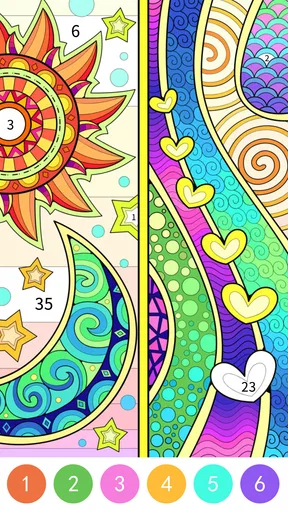

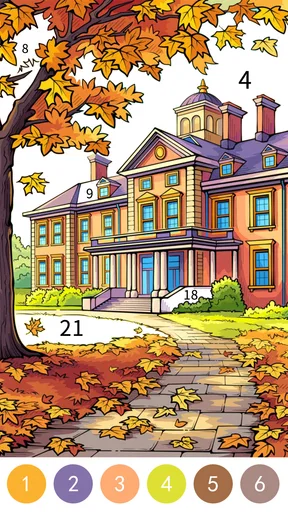
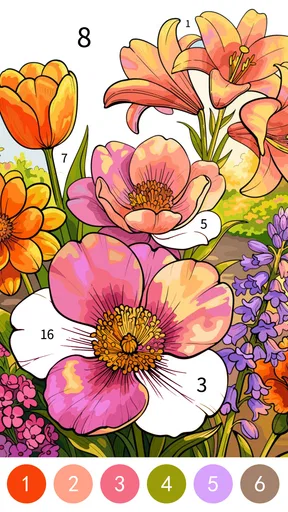
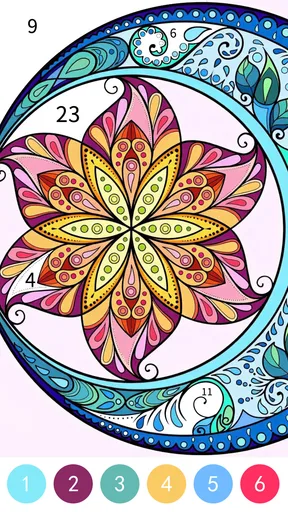


 Analysis by AppCompare
I went into Vivid Color Paint By Number expecting a simple way to fill numbered spaces, but the game feels more deliberate than a quick time-killer. It sits in the board-game corner of mobile entertainment, although its real appeal is the calm rhythm of coloring rather than competition or strategy. I choose a picture, match the numbered color, and work through the image one section at a time. That basic loop is easy to understand, yet it gives me enough structure to stay focused without demanding the attention of a traditional puzzle game.
That makes it a useful companion for quiet moments: a short break between tasks, a relaxed evening, or a low-pressure activity when I do not want to watch another video. The free entry point also makes it easy to try, while optional purchases ranging from $0.99 to $59.99 per item mean that I treat the paid elements as something to consider rather than an automatic part of the experience. My overall impression is positive, but the game works best when I approach it as a mindful coloring activity, not as a deep board game with layers of strategy.
How the coloring workflow feels in everyday use
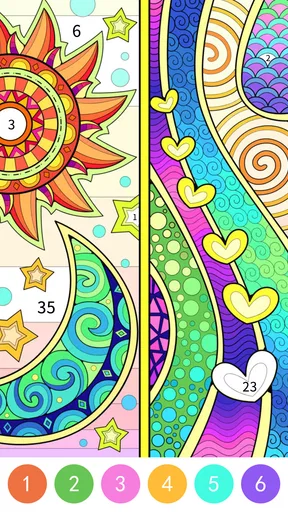
The first thing I appreciate is how quickly the central routine becomes familiar. I select an illustration, identify the active number, and tap the matching areas. The satisfaction comes from watching an unfinished picture gradually become complete. Unlike a blank coloring canvas, the numbered structure removes the pressure of choosing every color myself. I can concentrate on accuracy and progress instead of wondering whether the final image will look balanced.
In practice, I tend to begin with the larger, obvious sections. They give the picture shape quickly and make the remaining tiny spaces easier to locate. When I am using the game during a short break, I do not try to finish an entire image. I simply complete one color group or clean up a small region, then stop. That habit keeps the game relaxing instead of turning it into another task I feel obliged to complete.
The board-game classification makes sense in the broad mobile-store sense, but people looking for head-to-head play should adjust their expectations. This is a solitary activity. There is no need to wait for another player, learn a complicated ruleset, or protect a score. The challenge is mainly visual attention and persistence. I find that especially appealing late at night, when competitive games feel too stimulating.
One useful habit is to change the way I scan the image depending on its density. For a picture with large blocks, I move around the edges and fill broad areas first. For a detailed picture, I work in a small zone and finish it before moving elsewhere. That reduces the repeated searching that can make numbered coloring feel slower than it needs to be. It is a small adjustment, but it makes the experience feel more controlled.
The game is also approachable for mixed-age households. Its content rating is Everyone, and the basic interaction is straightforward enough for a child to understand with minimal guidance. I would still sit with a younger player at first, mainly to explain the number-color relationship and help with small sections. For adults, the same simplicity is part of the attraction: I can start playing without reading instructions or remembering a complicated system.
Worth Reading Before You Choose

EA SPORTS FC Mobile 26 Is a Bigger Football Game, but It Takes Time

Flipboard Shows What News Apps Must Do Beyond the Feed

Switching to Android Auto Means Rethinking Your Driving Routine

Google Calendar Makes a Crowded Week Easier to Manage

Ludo King Makes the Most of the Minutes Between Plans

Baby Panda World Brings Quick Play to Modern Phones, but Its Game Library Feels Busy
What I check before settling into a session
Before I begin a longer coloring session, I pay attention to the device environment rather than rushing straight into the first picture. Screen brightness matters because tiny numbered areas are much easier to distinguish on a comfortable display. I also keep the phone steady when working on detailed sections. A supported finger or a stable grip reduces accidental taps, which is more useful than trying to play quickly.
I do not treat every picture as equally suitable for every mood. A highly detailed image is rewarding when I want something absorbing, but it can feel fiddly when I only have a few minutes. A simpler image is better for a short break because the progress is visible sooner. This is one of the most practical ways to use the app: choose the level of visual concentration that matches the time and energy I actually have.
The current version is 1.4.7, and the game comes from Art Coloring Group. It has reached over a million installs, with an average rating of 4.4 from around 7.3 thousand ratings. Those figures suggest that the format has found a sizeable audience, but they do not change my main advice: try the free experience first and decide whether the coloring rhythm suits you before spending anything.
Because the game is free to install, the first question for many people will be whether it can be enjoyed without paying. My experience is that the free starting point is enough to understand the core loop and decide whether it belongs in your routine. I would not purchase simply to make the first session feel worthwhile. Instead, I would play normally, notice whether I return to it over several days, and only then consider optional content if it genuinely improves my enjoyment.
Settings and small habits that make a difference
I recommend checking the available in-game options before assuming the default setup is ideal. In a coloring game, sound and notification behavior can change the mood more than expected. If I want a quiet activity, I keep the phone’s media volume low or muted. If I am using the game as a more immersive wind-down routine, I prefer a comfortable brightness and fewer distractions from other apps.
I also look for any visual or interaction controls that make tapping more forgiving. The exact usefulness depends on the device, but the general principle is simple: prioritize clear visibility over speed. Tiny regions are where frustration begins, so I avoid covering the screen with a finger and use a lighter touch. When a tap does not register, I reposition rather than repeatedly pressing the same spot.
Experienced use is less about secret tricks and more about repeatable preparation. I place the phone where my wrist is supported, choose an image that matches my available time, and decide whether I am doing a quick color group or a full picture. That routine prevents the common mistake of opening the game without a plan, choosing an intricate image, and then feeling that the activity has become tedious.
For children, I would make the same adjustments in a slightly different way. A larger screen can be more comfortable for small areas, and a short session is usually better than asking them to complete a complex picture in one sitting. The Everyone rating makes the app broadly accessible, but accessibility in practice still depends on eyesight, motor control, and patience. Those personal factors matter more than the label alone.
Faster patterns without turning it into a race
The quickest improvement I found was to stop treating the active color as a command to search the entire picture randomly. I scan in a consistent direction, such as left to right across the upper half, then repeat below. This creates a visual memory of where I have already looked. It is especially helpful when the same number appears in scattered, narrow shapes.
Another effective pattern is to use the image’s structure. If the illustration contains a face, object, or landscape, I complete one recognizable component before jumping to another. The finished component becomes an anchor, and I can compare nearby areas more easily. This is not a formal feature or a special mode; it is simply a better way to use the numbered layout. It also makes progress feel more meaningful than filling isolated squares across the whole canvas.
I save the smallest spaces for moments when I am willing to slow down. Tiny areas are where careless tapping costs the most time, so I do not attack them while distracted. If I am listening to someone or waiting in a queue, I choose broad sections. If I am settled at home, I can handle the fine detail. Matching the task to my attention is more effective than trying to increase tapping speed.
One trade-off is that a systematic method can make the game feel less spontaneous. Some players may enjoy jumping to whatever catches their eye, and that is perfectly valid. My approach is better when I want steady progress, but it is not automatically more fun. I switch between free-form coloring and structured scanning depending on whether I am seeking relaxation or completion.
I also avoid chasing a perfectly efficient order. Since the appeal is partly repetitive and calming, optimizing every tap can remove the very quality that makes the game pleasant. The goal is not to finish as quickly as possible; it is to reduce unnecessary searching while preserving the quiet pace. That distinction is important for anyone comparing this with faster puzzle games.
Where the format reaches its limits
The simplicity that makes Vivid Color easy to start also limits its depth. There is no complex strategic layer for me to master, and the numbered coloring format does not offer the same variety as a logic board game, a competitive match, or a creative drawing app. Once I understand the routine, the challenge comes mainly from image detail and the desire to complete another picture.
That means I would not recommend it to someone who wants meaningful decisions, multiplayer interaction, or a strong sense of progression built around skill. A traditional puzzle game is a better choice if I want to reason through changing rules. A drawing app is better if I want full control over color and composition. Vivid Color occupies the middle ground: more guided than freehand art and calmer than most games.
There can also be friction when an image contains many small regions. The experience depends on accurate tapping, and a crowded design can turn a relaxing session into a search for one missed patch. I handle that by zooming my attention into one area and slowing down, but users with limited screen space or difficulty distinguishing small details may find the format tiring.
The purchase structure deserves a measured approach as well. The game is free, but in-app items are priced from $0.99 to $59.99 each. That is a wide range, so I would review each purchase carefully and avoid assuming that every optional item is necessary for a satisfying experience. For families, I would also make sure the device’s purchase protections are configured before handing the phone to a child.
Another limitation is emotional rather than technical: completion can become repetitive if I play for too long. I get the best results from short, intentional sessions. After a while, the same tap-and-search loop may stop feeling restorative. When that happens, I close the app rather than forcing myself through another picture. The game is strongest as a flexible break, not as an activity that needs to occupy an entire afternoon.
Who will enjoy it most
I think this is a good match for people who like guided coloring, gentle repetition, and visible progress. It is particularly suitable for someone who wants a low-pressure activity with clear instructions. The game can also work for commuters, students between study blocks, or anyone who wants to replace aimless scrolling with something slightly more focused.
It is less suitable for players who need constant novelty or direct competition. If your favorite part of a game is beating another person, building a strategy, or discovering hidden systems, the numbered coloring loop may feel too narrow. Likewise, artists who want to select their own palette may find the fixed-number approach restrictive rather than liberating.
The release date was January 4, 2024, and the minimum operating-system requirement is Android 7.1. That gives the game a broad technical reach on compatible Android devices, although the comfort of playing still depends on screen size and responsiveness. I would judge the experience on the actual phone or tablet I plan to use, especially if detailed pictures are the main reason I am interested.
For me, the strongest use case is a repeatable evening routine: lower the brightness, choose a moderately detailed image, complete one visual section, and stop before the activity becomes work. A different user might prefer five-minute sessions throughout the day. The app does not need to dictate one correct rhythm; its value comes from fitting neatly into the spaces I already have.
My verdict after settling into the routine
Vivid Color Paint By Number succeeds because it understands the appeal of guided progress. I do not need artistic confidence, a competitive mindset, or a large block of free time. I simply follow the numbers and watch an image take shape. Art Coloring Group keeps the central idea accessible, and the free installation makes testing the experience straightforward.
My recommendation comes with clear boundaries. I would choose it over a conventional board game when I want quiet concentration, and over a blank coloring app when I want help deciding what belongs where. I would not choose it over a logic puzzle when I want mental challenge, or over a creative drawing tool when I want personal expression. Its strength is the narrowness of its purpose.
The best way to get more from it is to build a small habit around it: match image complexity to available time, scan colors systematically when a picture gets crowded, keep the screen comfortable, and treat purchases as optional rather than essential. Those choices make the experience smoother without pretending that it contains hidden depth.
For anyone seeking a calm, approachable board-style game for Android, I think it is worth trying. The Everyone rating, free entry, and simple workflow make it welcoming, while the optional purchases and repetitive nature call for sensible expectations. My final view is that it is a pleasant tool for focused downtime, provided you want guided coloring rather than a conventional game challenge.
Pros
- Relaxing activity suitable for short or extended creative sessions.
- Large variety of coloring pages across multiple themes.
- Simple tap-to-fill controls are easy for beginners to understand.
- Completed artwork can be saved and shared with friends.
- Helpful hints make difficult or tiny sections easier to finish.
Cons
- Many attractive pictures may require watching ads or making a purchase.
- Small color sections can be difficult to select on smaller screens.
- Some content may need an internet connection to unlock or load.
- Frequent advertisements can interrupt the coloring experience.
- Limited creative freedom since colors and areas are preset.
FAQs for Vivid Color Paint By Number
What is Vivid Color Paint By Number?
Vivid Color Paint By Number is a relaxing digital coloring app that lets you complete illustrations by filling numbered sections with matching colors. It is designed for casual entertainment, creative expression, and stress relief, offering a simple tap-to-color experience suitable for users who enjoy coloring without needing traditional art supplies or advanced drawing skills.
How does the coloring process work in Vivid Color Paint By Number?
After choosing an image, the app displays numbered areas that correspond to specific colors in the palette. You select a color and tap the matching sections to fill them in. The interface generally helps identify unfinished areas, making it easy to continue even when details are small. Completed pictures can then be viewed, saved, or shared depending on the available features.
Is Vivid Color Paint By Number free to download and use?
The app can typically be downloaded at no initial cost, but users should expect that some content or features may be supported by advertisements, optional purchases, or premium access. The exact selection of free images, ad frequency, and subscription terms can vary by platform and app version, so it is worth checking the store listing before downloading or approving any payment.
Does Vivid Color Paint By Number work offline?
Some previously loaded coloring pages may remain available without an internet connection, allowing you to color when traveling or using limited data. However, internet access may still be required to download new artwork, display advertisements, synchronize progress, or use sharing and other online functions. Offline availability can differ between versions, so users should test the app before relying on it without connectivity.
Is Vivid Color Paint By Number suitable for children?
The basic tap-based gameplay is easy for many children to understand, but parents should review the app’s age rating, advertising, in-app purchase options, and privacy information before allowing independent use. Some illustrations or promotional content may not be aimed at very young users. Parental controls and purchase restrictions are recommended, particularly if the device is shared with children.


